

LightIO
Demos             FAQ                          ";
Removing the causes of pain and injuries from using computers!

Questions & Answers

  1. What improvements does the Touchless Touchpad have over the old Touchless Mouse?

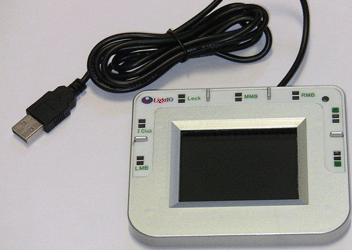
    The biggest improvement is on the cusor movement part. Now the cursor can be moved in more directions with more different speeds. Because the cursor sensor is confined to a pad, the events of hitting the buttons and accidentaly move the cursor at the same time can be avoided completely.

    The new Lock button enables single handed strain free drag'n drop actions. The new 2-click button reduces the double -click to 2 single click.

  2. Why does the Touchless Touchpad provide 2 modes of moving the cursor?

    For some people who don't move the cursor a lot still prefer the old way of moving hand to move the cursor. The 2 modes can allow these people to use the pad without learning new skills.

  3. Is the Still mode difficult to learn?

    Everybody can use the still mode at its slowest speed. But to be efficient, you need to be flexible and agile at different speed of the cursor movement. Different people repond differently to this type of new way of moving cursor. Some clever ones can start right away and become used to it in a few minutes for such a simple no-action activity. But some people cannot control their finger to stop moving and can take a few days to be able to use it at ease. There are also some who give up after several attempts. However, the relief this mode offers to the body really deserves some time of practice.

  4. To use a Touchless Mouse, my fingers are exposed to the Infrared radiation from time to time, is it safe?

    It's very safe because every living human being is a source of Infrared radiation. Any one of our fingers is under constant Infrared radiation from other fingers. On the other hand, the radiation from the Touchless Mouse is only working at a short distance and short pulsed, the intensity of the radiation is less than 1/10 of that from a remote control, and is weaker than that from your own body's radiation field.

  5. Your Touchless Mouse has only 8 directions to move the cursor, what if I need to do fluid movement?

    We did intensive investigations when we were developing the Starfish Pointer that has 24 directions. It turns out that no matter how you move the cursor with a mouse, the cursor moves in small segments in X and Y directions because the pixels in screen are laid out in a matrix form. So all the movement of the cursor can be broken down into 3 direction types: on X-axis, on Y-axis, and on X-Y 45 degree slopes. The 8 directions are the elements of the directional movement of a cursor. Since the smallest step that our Touchless Mouse can move a cursor is just one pixel, you can trace any curves or paths along which a regular mouse can move the cursor with our Touchless Mouse.

    It is found that in most graphics software, only the start point and end point are used to define a shape or a curve. Our Touchless Mouse is better at moving the cursor to specific points than a regular mouse. In some drawing software, when you want to draw arbitrary fluid curves, it is still possible to use the inner ring of our Touchless Mouse to make a "fluid" path.

  6. How is the efficiency and performance of a Touchless Mouse in comparison with a regular mouse?

    A Touchless Mouse is more efficient than a regular mouse in the sense that when you move a cursor with a touchless mouse, the cursor can move in the shortest path towards the destination point without wasting any motion. When using a regular mouse, the cursor cannot go in straight lines but winding around before reaching the neighborhood of the destination point. Since the pixels are distributed in rectangular arrays on a monitor, moving in straight line is more efficient than a wavy path.

    The performance of the Touchless Mouse, meaning the speed of getting things done, varies widely among users with different level of experience. For beginners, slower inner rings are often used to position the cursor at a desired location. Users who can go with the fast speed of the outer ring, often with another finger to control the center stop entry, can achieve a high performance only limited by the eye sight of monitoring the cursor movement.

    Considering the realistic fact that most regular mouse has a limited space on the desktop to move, also due to the limited length of the arm, it often takes multiple motions of picking up, pushing/pulling the mouse back and forth to complete a desired movement of the cursor. Also considering the fact that when the finger, wrist, or arm are hurting, it's reluctant for the user to grip and move the mouse, then the Touchless Mouse has a much better performance for work in the long run.

  7. Is a Touchless Mouse difficult to learn and use?

    For beginners who never used mouse before, the Touchless Mouse is actually easier to learn and use than a regular mouse because when using mouse, it's difficult to track the path of the cursor. But for those who have years of experience using mouse with a strong habit of moving the cursor with the movement of hand, it takes a few minutes to overcome the habit of using a moving finger to move the mouse.

    Another issue is to raise the finger and stop the cursor right on target. Every user can use the slowest speed with no problem, but it's too slow. It takes some time to learn to move at a fast speed. And the learning time varies from a few minutes to several days.

    It doesn't take a learning curve to do touchless clicking. Pay attention to how far your finger is above the surface to start triggering the light, then double clicking can be done by a minimal waving of the finger.

  8. How long does it take to become proficient of using the Touchless Mouse?

    It takes 20-30 seconds to get to know how each element functions and become productive. Some smart people become proficient in 15 minutes.

    However, each person's hand and learning ability is different. Once you've found how to comfortablly position the Touchless Mouse and your hand, you'll become efficient very fast.

  9. Regular mouse and touch pad use hand movement to move the cursor, why Touchless Mouse doesn't?

    A major harmful effect of regular mouse and touch pad is the too much movement of the hand. For a typical computer worker, a day's use of the mouse may need to move the hand for many miles, very harmful to the wrist and shoulder. It's also a cause of carpal tunnel syndrom.

    At the beginning we did put in the feature to use the motion of the finger to move the cursor to follow people's habbit. But when we found that moving the cursor with hand at still can also achieve a comparable performance and without the harmful effet, we disabled that feature.

  10. I need to look at the panel from time to time to use the Touchless Mouse, is it an inconvenient action?

    For new users it is similar to using a keyboard that a look at the panel from time to time is needed. However, it doesn't take long, much shorter than learning a keyboard, to become a natural action without the need to see the panel.

    On the other hand, infrequently moving your head up and down slightly is a good thing to your neck and eye to break from the static posture of staring at the screen all the time.

  11. What pen or stick can I use instead of my finger?

    What is needed is a small reflective surface that can reflect enough Infrared light to trigger the sensors. An ordinary ball-point pen will work with its bigger head that is hard, smooth, and reflective. A metal head is the best. Black plastic heads don't work. Soft, dummy heads don't work either. Some pencil heads work sometimes.

    LightIO's Infrared pen and LED pen both work.

  12. Will it also work if my fonger is in touch with the panel?

    Yes, if you try and you'll see that it is functional when your finger is within 0-5mm from the holes. Sometimes place your finger or pen head on the hole is convenient, but to avoid the clicking forces completely, it's recommended to rest the hand beside the module and wave slightly to operate it.

Shopping Cart

Proceed to check out with:


-- via --

-- or --
-- or --

Check or money order

We accept checks and money orders for your convenience. Please pay to Lightio, and mail the order information and payment to
Sales/Lightio
950 Eton Way
Sunnyvale, CA, 94087
USA

Shipping, Handling & Refund

We ship world wide. U.S. domestic shipping is via USPS Priority Mail small flat rate box only. The cost consists of $5.20 postage and $2.50 handling fee to a total of $7.70.

Contact us first and get quotation for shipping cost to outside of the U.S.

All purchases from this website has 60-day unconditional money back guarantee and 1 year warranty.